




Admin & setup
How to ensure Windows respects DSCP headers
Windows requires an update to the Group Policy to make sure our DSCP headers on voice traffic are respected.
Legacy Help Docs
When using Windows computers, to ensure that Cradle traffic on outbound calls is prioritised on your network, you'll need to just follow these instructions. This requires an update to the Group Policy on each of the machines using Cradle on your network.
In the Group Policy Management Editor (accessed by entering gpedit.msc through Run), expand Computer Configuration, then** Windows Settings**, right-click** Policy-based QoS**, and then click** Create new policy**:
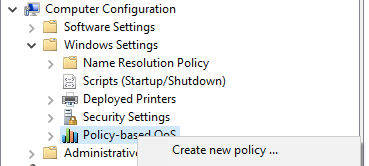
- In Policy-based QoS, you'll want to name the policy something like Cradle QoS to easily identify it. Select Specify DSCP Value and set the value to 46. Leave** Specify Outbound Throttle Rate** unselected, and then click** Next**.
- Select Only applications with this executable name. Enter
Cradle Desktop.exe, and click** Next**. This setting sets the policy to only prioritise matching traffic from Cradle. - On the third page, make sure that both Any source IP address and** Any destination IP address** are selected, and then click** Next**.
- On page four, choose UDP in** Select the protocol this QoS policy applies to**.
- In Specify the source port number, make sure that both** Any source port** and** Any destination port** are selected and then click** Finish**.
To put the new policy in force, the Group Policy needs to be refreshed on each on the computers. It’s refreshed once in a while, or after a restart, but you can force the refresh by running this in the command console or restarting the computer manually:
## as administratorC:\Windows\system32> gpupdate.exe /force
If using Win7: https://support.microsoft.com/en-us/help/2733528/policy-based-qos-not-working-in-windows-7-clients